How Automation Can Save Time on Everyday Tasks
Learning how automation can save time on everyday tasks is one of the most effective ways to reclaim hours in your week. By shifting repetitive chores to smart software or hardware, you reduce the mental load that often leads to burnout. Whether it’s managing your finances or streamlining household chores, small technical shifts make a massive difference.
This approach isn’t about laziness; it’s about strategic living. You’ll find that by applying these systems, you gain more focus for the work that truly matters to your personal growth.
The core time-saving impact
The primary way automation saves time is by removing the “micro-decisions” that clutter your day. When you automate a bill payment or a recurring grocery order, you aren’t just saving the physical minutes it takes to click a button. You are eliminating the need to hold that task in your memory.
Research suggests that the average person spends roughly five to seven hours per week on low-value administrative tasks. By delegating these to software, you can effectively reclaim nearly an entire workday each month.
Automating personal finances
Managing money is often the most time-consuming yet predictable chore for most adults. You can set up recurring transfers, automatic bill payments, and even investment contributions through your banking app. Most modern financial institutions offer a “set it and forget it” feature for recurring utility bills.
By leveraging these, you ensure that your obligations are met without ever having to log in or remember a due date. This reduces the risk of late fees, which often cost the average household $30 to $50 per missed payment.
Managing household utilities
Smart home technology has transformed how we handle basic maintenance tasks. Devices like smart thermostats learn your schedule and adjust temperatures based on whether you are home or away. This automation not only saves time by removing the need for manual adjustments but also reduces energy consumption by up to 10% annually.
Similarly, robotic vacuums can be scheduled to run while you are at work. You return home to clean floors without having spent a single minute pushing a vacuum cleaner yourself.
Streamlining digital communication
Email management often feels like a full-time job for many professionals. You can use filtering rules in services like Gmail or Outlook to automatically sort incoming mail into folders. For instance, newsletters can be sent directly to a “Read Later” folder rather than cluttering your primary inbox.
Furthermore, using templates or canned responses allows you to reply to repetitive inquiries in seconds. This simple act of creating a library of saved responses can shave off 30 to 60 minutes of typing time per day.
Comparing manual vs automated workflows
To see the tangible benefits, it helps to look at how specific tasks compare when they are manual versus automated. The following table highlights the difference in time investment for common activities.
| Task | Manual Time (Weekly) | Automated Time (Weekly) |
|---|---|---|
| Bill Payments | 45 Minutes | 0 Minutes |
| Inbox Sorting | 120 Minutes | 10 Minutes |
| Grocery Ordering | 90 Minutes | 15 Minutes |
| Home Cleaning | 180 Minutes | 20 Minutes |
Leveraging AI for daily productivity
Artificial Intelligence has introduced new ways to handle complex cognitive tasks. You can use AI tools to summarize long documents, schedule meetings, or draft routine correspondence. For example, if you need to pull information from a series of files, AI models can extract the data in seconds.
This capability allows you to process information at a scale that was previously impossible. According to resources from the Organisation for Economic Co-operation and Development, integrating these tools is a major driver of modern efficiency.
Setting up recurring digital habits
The real power of automation comes from consistency. You should start by identifying the tasks you perform at least three times a week. Once identified, look for a digital tool that can handle the process for you.
For example, if you manually track your fitness progress, use a wearable device that syncs data to an app automatically. By reducing the friction required to start a task, you are much more likely to maintain a positive habit over the long term.
Common tools for home automation
There are several categories of tools that help you take control of your time. You don’t need a high-end smart home setup to begin seeing results. Start with these simple, effective options:
- IFTTT (If This Then That): Connects different apps to trigger actions, such as saving email attachments to cloud storage automatically.
- Smart Plugs: Allows you to turn off lamps or small appliances via a timer or voice command.
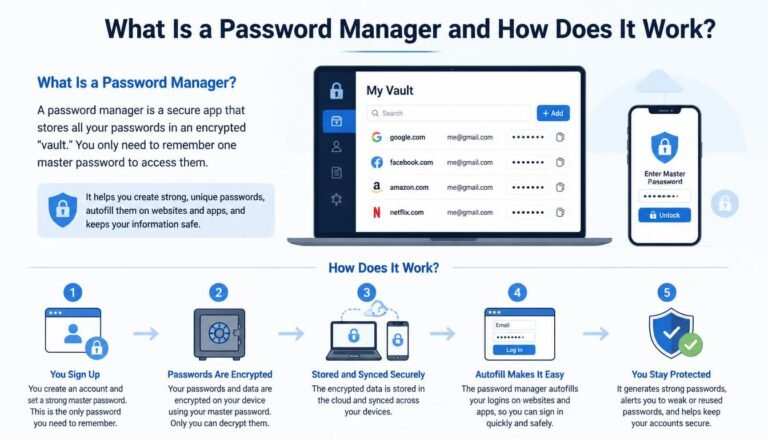
- Password Managers: Eliminates the time spent resetting passwords or manually typing login credentials.
- Calendar Scheduling Tools: Tools like Calendly remove the back-and-forth emails needed to set up meetings.
Overcoming the setup hurdle
Many people hesitate to automate because the initial setup feels like a burden. It is true that configuring a new system requires an upfront investment of time. However, this is an investment that pays dividends almost immediately.
Think of it as front-loading your effort to enjoy a “time dividend” for months or years to come. If a task takes you 30 minutes to automate but saves you 5 minutes every day, you will break even in just one week.
Addressing common automation concerns
It is normal to worry about losing control when you hand tasks over to software. However, you can always set up notifications to ensure you stay informed about critical changes. Automation is designed to handle the mundane, not the meaningful.
By delegating the repetitive, you actually gain more control over your life because you are no longer distracted by trivial chores. You become the architect of your schedule rather than a servant to your to-do list.
Frequently asked questions
Can I start automating my life if I am not tech-savvy?
Absolutely. Most modern automation tools are designed for ease of use. You don’t need to know how to code; you simply need to follow a few prompts within an app to connect two services.
Is it safe to automate my bank accounts?
Yes, as long as you use reputable financial institutions and secure, multi-factor authentication. Reputable banks use high-level encryption to protect your automated transactions.
Does automation make me lazy?
Automation actually makes you more intentional. By offloading repetitive work, you free up mental energy for creative, strategic, or personal activities that actually drive your growth.
What is the best way to start the process?
Pick one task that you find particularly boring or annoying. Research one tool that handles that specific task, set it up, and test it for a week before moving on to the next one.
How much does it cost to automate?
Many of the most effective tools have free tiers that are more than sufficient for personal use. You can achieve significant time savings without spending a dime on software subscriptions.
Moving forward with your new routine
Refining your daily workflow is a journey rather than a one-time project. As you become more comfortable with how automation can save time on everyday tasks, you will naturally look for more opportunities to optimize. Start small, verify that your systems are working correctly, and then expand to other areas of your life.
The goal is to create a lifestyle where technology works for you, rather than the other way around. By consistently removing friction, you create the space needed to pursue your passions and enjoy your downtime. Keep experimenting with new tools, and you will soon find that your daily routine feels significantly lighter and more manageable.