What Is a Password Manager and How Does It Work?
Understanding a <strong>Password Manager and How Does It Work is the first step toward securing your digital life against the rising tide of cyber threats. Most people struggle to remember dozens of unique, complex login credentials, often leading to the dangerous habit of reusing simple passwords across multiple accounts.
By leveraging specialized software to handle these tasks, you can reclaim your online privacy without the cognitive load of memorization. This article explores the mechanics behind these tools, how they protect your data, and why they are considered an essential component of modern digital hygiene for individuals and businesses alike.
Defining the Role of a Password Manager
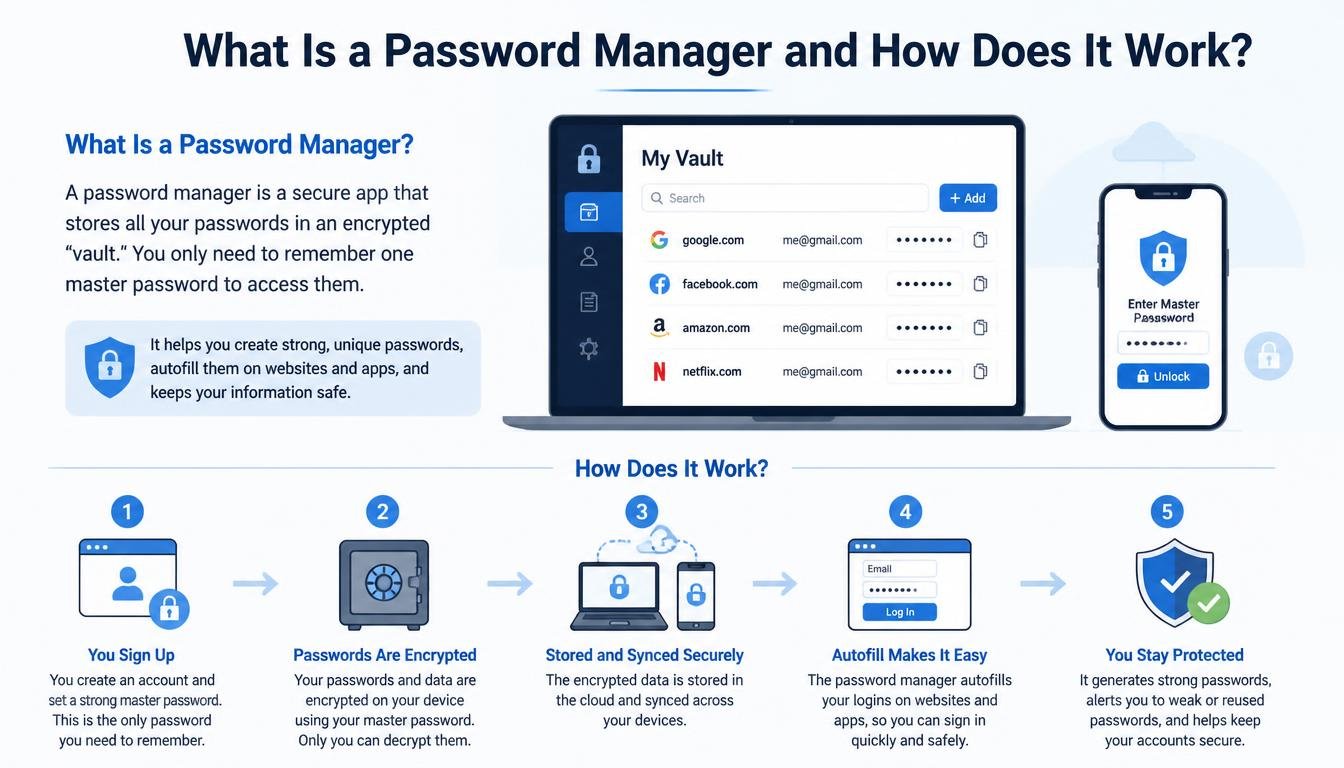
At its core, a password manager is a digital vault designed to store, organize, and retrieve your login credentials. Instead of relying on your memory or a physical notebook, you entrust these tools to keep your sensitive information in an encrypted database.
When you visit a website, the software automatically fills in your username and password, saving you time and reducing the risk of typing errors. Beyond simple storage, these programs act as personal security assistants that actively monitor the strength of your existing credentials.
Most modern services go beyond basic storage by generating high-entropy, random strings of characters for every new account you create. Because these passwords are too complex for a human to memorize, the software handles the complexity entirely behind the scenes.
You no longer need to worry about creating a “clever” password that includes birthdays or pet names, which are easily guessable by malicious actors. By delegating this process to a machine, you ensure that every account you own is protected by a unique, nearly uncrackable string of data.
The Mechanics of Encryption
To truly grasp a Password Manager and How Does It Work, you must understand the concept of zero-knowledge encryption. When you save a password, the software does not simply store it as plain text that anyone can read.
Instead, it uses advanced cryptographic algorithms—often AES-256—to scramble your data into an unreadable format before it ever leaves your device. This process happens locally, meaning the company providing the software never sees your actual credentials.
Your data is locked behind a single, highly complex key known as the master password. This is the only piece of information you are required to memorize, and it serves as the gateway to your entire digital identity.
Because the encryption keys are derived from this master password, the service provider cannot decrypt your vault even if they wanted to. If you lose this master credential, your data is effectively permanently locked, which highlights the importance of choosing a phrase that is both memorable to you and impossible for others to guess.
How the Vault Interacts with Your Browser
The interaction between your computer and your password manager typically happens through a browser extension or a dedicated desktop application. When you navigate to a login page, the extension recognizes the URL and checks its local database for a matching entry.
If a match is found, the software prompts you to autofill the fields with the saved information. This prevents “man-in-the-middle” attacks where a malicious website might try to intercept your keystrokes.
This integration also provides a crucial defense against phishing attempts. If you land on a fake version of a banking website that looks identical to the real one, the password manager will not recognize the domain.
Because it does not see the URL it expects, it will refuse to autofill your credentials, potentially saving you from logging into a fraudulent site. This automated behavior provides a layer of security that human intuition often misses, acting as a silent bodyguard for your accounts.
Comparing Security Features
Not all security tools are created equal, and it is helpful to look at the differences between built-in browser managers and dedicated third-party applications. While browsers like Chrome or Safari offer basic saving features, they are often tied to your broader account ecosystem. Dedicated managers provide more granular control and often include auditing tools to alert you when a password has been compromised in a data breach.
| Feature | Browser-Based Manager | Dedicated Password Manager |
|---|---|---|
| Cross-Platform Syncing | Limited to ecosystem | Seamless across all OS |
| Security Auditing | Minimal | Advanced/Real-time |
| Password Generation | Basic | Highly customizable |
| Sharing Capabilities | Poor | Secure sharing methods |
| Offline Access | Variable | Highly reliable |
As shown in the table above, the distinction lies in the depth of protection and the flexibility of use. While browser-based options are convenient for casual users, those with a high volume of sensitive accounts usually prefer dedicated software. These tools often include additional features like secure document storage, emergency access for family members, and multi-factor authentication (MFA) integration.
The Importance of the Master Password
The master password is the foundation of your entire security architecture. Since it is the “key to the kingdom,” you should treat it with the same care as a physical key to your home.
A strong master password should be a passphrase—a string of random words—that is long enough to resist brute-force attacks. You can find more information on best practices for credential security through the Cybersecurity and Infrastructure Security Agency.
Avoid using a word that can be found in a dictionary, as modern cracking software can cycle through millions of common phrases in seconds. Instead, mix unrelated words, numbers, and symbols to create a unique sequence.
Because you only have to remember this one string, you can afford to make it significantly longer and more complex than any other password you use. Once you have established this master key, you are essentially securing every other account you own with a single, impenetrable lock.
Common Myths and Misconceptions
Many people hesitate to adopt this technology because they fear that putting all their “eggs in one basket” makes them a bigger target. While it is true that you are concentrating your credentials in one place, that place is significantly more secure than a sticky note on your monitor or a list in a spreadsheet. A vault encrypted with military-grade standards is exponentially harder to crack than a reused password on a vulnerable website.
Another common myth is that password managers are too complicated for the average user. In reality, modern interfaces are designed for accessibility, often requiring only a single click to set up and manage.
Once the extension is installed, the software works quietly in the background, rarely requiring intervention unless you are updating or creating a new account. The initial learning curve is minimal, and the peace of mind gained from knowing your accounts are secure far outweighs the effort of the initial setup.
Managing Data Across Multiple Devices
In a world where we move between phones, tablets, and laptops, the ability to sync your credentials across devices is essential. A reliable manager will use cloud-based synchronization to ensure that a password created on your desktop is immediately available on your smartphone. This synchronization is encrypted end-to-end, meaning the data remains protected even while it is in transit or stored on the provider’s servers.
This convenience ensures you are never locked out of an important account when you are away from your primary workstation. It also encourages better security habits, as you are more likely to use a strong, generated password if it is easily accessible on your mobile device. If you lose your phone, you can simply revoke access from that device through your account dashboard, ensuring your credentials remain safe even in the event of hardware theft.
Frequently Asked Questions
Is it safe to store all my passwords in one place?
Yes, it is safer than the alternative. By using a reputable manager, your data is protected by encryption that would take current supercomputers millions of years to break, provided your master password is strong.
What happens if I forget my master password?
Most services offer a “recovery key” or an emergency contact feature that you should set up immediately after creating your account. Without these, or if you lose the master password, your encrypted data becomes inaccessible, as the provider has no way to reset it for you.
Why should I avoid using my browser’s built-in manager?
While browser managers are convenient, they often lack advanced security features like password health reports, secure sharing, and the ability to store non-password data like identity documents. They also tie your credentials to your browser account, which can make switching browsers more difficult.
Can a password manager help prevent phishing?
Yes, because a manager will only autofill credentials on a domain that matches the one you saved. If you are on a spoofed or malicious website, the manager will not recognize the URL and will not fill in your information, alerting you to the potential danger.
Do I need to pay for a good password manager?
Many excellent, free versions exist for individual users that provide all the essential features. Paid tiers typically add value through premium customer support, advanced file storage, or family sharing plans, but they are not strictly necessary for basic security.
Closing Thoughts on Digital Security
Taking control of your digital identity is a rewarding process that begins with understanding how these tools function. By moving away from the dangerous practice of password reuse and embracing the automation provided by a password manager, you significantly lower your risk of identity theft and data loss. The shift requires only a small amount of initial effort to set up your vault and choose a strong master password.
Once that foundation is in place, the software handles the complexity for you, allowing you to browse the web with confidence. Start by choosing a reputable service, installing the extension, and moving your most sensitive accounts over to your new, secure vault today.