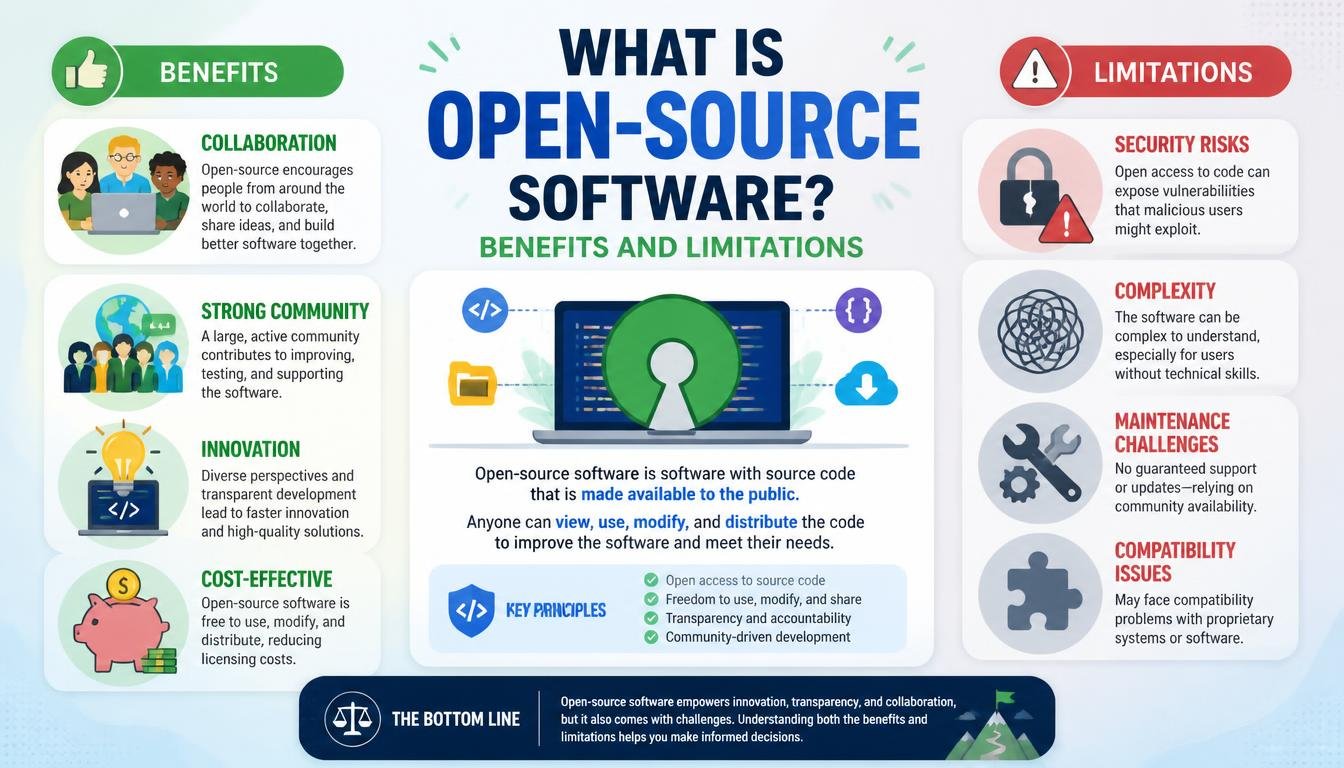
What Is Open-Source Software? Benefits and Limitations?
Understanding open-source software? Benefits and limitations is essential for anyone navigating the modern digital landscape. At its core, this software provides users with access to the original source code, allowing them to study, change, and distribute it to anyone for any purpose.
Unlike proprietary programs where the internal mechanics remain locked behind a corporate vault, these projects thrive on transparency and collective intelligence. Whether you are a developer looking for tools or a business owner seeking cost-effective solutions, grasping how this model operates will help you make better technology choices for your specific needs.
Defining Open-Source Software
When you ask what is open-source software? Benefits and limitations often start with the definition of the license itself. Open-source refers to computer programs where the source code is made available to the public.
This means anyone with the right technical skills can inspect the programming logic, identify potential bugs, and suggest improvements to the original authors. It is a departure from the traditional “black box” model of software development.
The philosophy behind this movement is rooted in the belief that software should be a collaborative endeavor rather than a guarded secret. By sharing the blueprints, the community can collectively solve problems faster than a single internal team ever could.
This transparency is the fundamental pillar that supports the entire ecosystem. It transforms software from a product sold in a box into a living, breathing resource that evolves through public contribution.
You might wonder how this differs from proprietary software. Proprietary programs are owned by a single entity, usually a company like Microsoft or Adobe, which retains exclusive rights to the code.
Users only purchase a license to execute the application, but they never gain access to the underlying instructions. In contrast, open-source projects welcome public audit, ensuring that the software remains accountable and adaptable to the needs of its user base.
The Core Benefits of Open-Source Solutions
The primary advantage of choosing open-source tools is the total lack of vendor lock-in. Because the code is open, you are not beholden to the whims of a single software provider.
If a company decides to discontinue a product or hike prices, the community can maintain a “fork” of the project to keep it alive. This gives organizations a sense of control and long-term stability that proprietary vendors often cannot guarantee.
Cost efficiency is another major factor for many businesses. While you might still pay for enterprise-grade support or specialized hosting, the license fees associated with the software itself are typically non-existent.
This allows startups and non-profits to access high-end technology that would otherwise be far outside their budget. The money saved on licensing can be redirected toward infrastructure or hiring developers to customize the software.
Security through visibility is a concept often debated, but it remains a significant benefit. With thousands of eyes on the source code, vulnerabilities are frequently discovered and patched at a rapid pace.
This contrasts with proprietary software, where a security flaw might remain hidden for months or years, known only to the developer and potentially malicious actors. You can find detailed information on these standards at the Open Source Initiative official definition page.
Common Limitations and Challenges
One of the most immediate hurdles for non-technical users is the lack of dedicated, professional support. In a proprietary environment, you have a helpline or a service level agreement (SLA) to fall back on when things go wrong.
With open-source, you are often reliant on community forums, documentation, or your own internal team to troubleshoot issues. If the project is small or niche, finding an answer to a specific bug might prove frustratingly difficult.
Usability can also be a sticking point for many open-source projects. Because these tools are often built by developers for developers, the interface and user experience (UX) might not be as polished as a commercial product designed for the general public.
You might find that a powerful tool requires a steep learning curve or extensive command-line configuration. For a business that needs a simple, “plug-and-play” solution, this can translate into significant training costs.
Compatibility and integration are other areas where limitations appear. Proprietary software suites are often designed to work seamlessly with one another, creating a unified ecosystem.
Open-source projects are often developed in isolation, meaning you might need to build custom “glue code” to make two different applications talk to each other. While this is solvable, it requires a level of technical expertise that many small organizations simply do not have in-house.
Comparing Proprietary vs. Open-Source
Choosing between these two models involves balancing control against convenience. The table below highlights the key differences that organizations must consider when making their procurement decisions.
| Feature | Open-Source Software | Proprietary Software |
|---|---|---|
| Source Code Access | Fully accessible | Restricted |
| License Costs | Often free | Subscription or upfront fee |
| Support Model | Community-driven | Vendor-provided SLA |
| Customization | High freedom | Limited by vendor |
| Updates | Publicly managed | Controlled by vendor |
As seen in the table, the trade-off is clear. If your organization values autonomy and has the technical staff to manage your own infrastructure, open-source is a powerful path.
If your team lacks specialized developers and you prefer to pay a premium for guaranteed maintenance, proprietary systems offer a lower-stress alternative. Neither is objectively “better,” but both serve very different operational needs.
The Role of Community and Collaboration
The strength of any open-source project is directly tied to the health of its community. A vibrant ecosystem of contributors ensures that the software receives regular security audits and feature updates.
When a project becomes popular, it attracts developers from around the world who donate their time to refine the code. This collective effort is what allows projects like the Linux kernel or the Apache web server to power the vast majority of the internet.
However, community-driven development can be unpredictable. If the lead developers lose interest or if the project lacks a clear roadmap, the software can stagnate.
This is often referred to as “project abandonment.” Before adopting an open-source tool, it is wise to check the frequency of commits, the number of active contributors, and the activity level on issue trackers.
You should also consider the governance model of the project. Some projects are managed by non-profit foundations, while others are essentially controlled by a single company that releases its code under an open license.
The latter is sometimes called “open-core,” where the basic version is free, but advanced features are gated behind a paid wall. Knowing who pulls the strings helps you predict the long-term viability of the tool.
Security Concerns and Reality
There is a persistent myth that open-source code is inherently less secure because anyone can see the vulnerabilities. In reality, the security of software is rarely defined by whether the code is hidden or exposed.
It is defined by the rigor of the development process and the speed of the patch cycle. When a vulnerability is found in an open-source library, a fix is often distributed to the entire world within hours.
Conversely, when a vulnerability is found in proprietary software, the vendor must first acknowledge it, develop a patch, and then push it out to millions of users. This process can take weeks or months.
During that window, the vulnerability is a “zero-day” threat that attackers can exploit. The transparency of open-source allows for a more responsive, albeit more public, security posture.
That said, you must still be diligent about your own security practices. Just because a project is open-source does not mean it is automatically safe to use in a production environment.
You are responsible for keeping your dependencies updated and auditing the code that runs on your servers. If you do not have the capacity to monitor these updates, you may be creating a massive security hole in your own infrastructure.
The Future of Open-Source Adoption
We are currently seeing a massive shift where even the most traditional companies are embracing open-source. It is no longer just for hobbyists or academics; it is the foundation of modern cloud computing and artificial intelligence.
Companies like Google, Meta, and Microsoft contribute millions of lines of code to the public domain because it benefits their own businesses to have standardized, high-quality tools. This level of corporate backing has made open-source more robust than ever before.
The rise of AI has further accelerated this trend. Many of the most powerful large language models and machine learning frameworks are being released as open-source projects.
This democratization of technology means that a developer in a garage can access the same tools as a Fortune 500 company. The barrier to entry for innovation has never been lower, thanks to this collective sharing of knowledge.
As we look toward the future, the distinction between proprietary and open-source will likely become even more blurred. Most modern commercial software is built upon a foundation of hundreds of open-source libraries.
Even if you use a “closed” product, you are almost certainly using open-source code under the hood. Understanding this reality is the first step toward becoming a more informed consumer of technology.
Frequently Asked Questions
Is open-source software always free to use?
While most open-source software is free to download and use, the term “open source” refers to the license of the code, not the price. Some projects are free, while others charge for enterprise support, proprietary add-ons, or cloud-hosted versions of the software.
Does using open-source software require coding skills?
It depends on the software. Many popular applications, like web browsers or office suites, are user-friendly and require no coding knowledge. However, if you are implementing server-side tools or infrastructure, you will likely need a technical team to handle installation, security, and maintenance.
Why would a company release its software for free?
Companies often release their code to create a standard, foster a community, or drive adoption of their paid services. By making their software the default choice for developers, they can build an ecosystem around their brand, which often leads to more profitable opportunities down the road.
Is open-source software less reliable than proprietary alternatives?
Not necessarily. Many open-source projects, such as the Linux kernel, are used by the world’s largest banks and government agencies because they are highly stable and transparent. Reliability usually depends on the specific project’s maturity and the size of the community maintaining it.
What happens if an open-source project stops being updated?
If a project is abandoned, it remains functional, but you will stop receiving security patches and new features. This is a risk for businesses. If you rely on such software, you may need to hire a developer to maintain a private fork of the code or migrate to a different, actively maintained alternative.
Conclusion
Navigating the world of open-source software? Benefits and limitations requires a clear understanding of your own technical needs and resources. By leveraging the transparency and collaborative power of these tools, you can build flexible, cost-effective systems that evolve with your goals.
While the lack of formal support and the potential for a steep learning curve are real factors, the trade-off is often worth it for the independence and security that comes from owning your technology stack. As you move forward, start by auditing your current software needs and identifying where open-source alternatives might offer a better fit. Engage with the communities behind the projects you use, contribute back when possible, and stay informed about the updates that keep your systems secure.