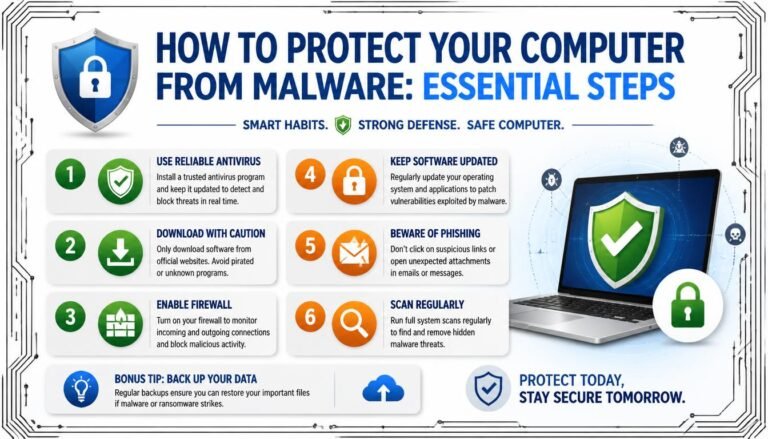
Common Cybersecurity Mistakes You Should Avoid
Identifying the most common Cybersecurity Mistakes You Should Avoid is a critical step in shielding your personal and professional digital assets from harm. Many users inadvertently create vulnerabilities by relying on outdated habits, such as reusing simple credentials or ignoring urgent software updates. These lapses provide easy entry points for threat actors looking to exploit human error rather than technical flaws.
By recognizing these patterns, you can significantly reduce your risk profile and establish a more resilient digital presence. This article outlines the primary traps you should steer clear of to keep your information secure in an increasingly interconnected environment.
The Peril of Weak and Reused Credentials
The most frequent entry point for unauthorized access is the reliance on predictable or recycled passwords. When you use the same string of characters for your banking portal, your social media accounts, and your work email, a single data breach elsewhere becomes a master key for your entire digital identity. Many users prioritize convenience over complexity, opting for names, dates, or simple sequences that automated hacking tools can guess in seconds.
The risk is compounded when services suffer database leaks. If a platform you signed up for years ago is compromised, attackers often dump those credentials into public databases.
They then use automated scripts to try those exact combinations across thousands of other sites. If you haven’t updated your login credentials, you are effectively handing over the keys to your accounts without the attacker needing to break a sweat.
A strong credential strategy involves moving away from memorable phrases toward randomized strings. Using a dedicated password manager allows you to generate and store unique, high-entropy keys for every service you use.
You only need to remember one master password, which should be long and complex. This transition is perhaps the single most effective action you can take to mitigate the risks associated with poor identity management.
Ignoring Software Updates and Patching
Software developers frequently release updates to fix security holes, yet many users delay these installations for weeks or months. These updates are rarely just about adding new features or improving interface design. In most cases, they contain “patches” that close specific vulnerabilities discovered by researchers or identified after an active exploit has been detected in the wild.
When you ignore a prompt to update your operating system or your browser, you are essentially leaving a door unlocked in your home. Cybercriminals scan the internet for unpatched systems, looking for known flaws that have already been documented but not yet fixed by the user. Once they identify a target running an outdated version of a common application, they can deploy automated payloads to gain control.
It is helpful to enable automatic updates wherever possible. This removes the human element of procrastination from the equation.
If you are managing a business or a home office, ensure that your secondary devices—such as printers, smart cameras, and routers—are also checked for firmware updates periodically. These often-overlooked devices can serve as a persistent foothold for attackers if their internal software remains unpatched.
Falling for Phishing and Social Engineering
Phishing remains the most prevalent method for compromising sensitive information. Attackers craft emails or messages that appear to come from trusted sources, such as your bank, a delivery service, or a colleague. These messages often create a false sense of urgency, pressuring you to click a link or download an attachment immediately.
The danger lies in how well these messages mimic official communications. They often use high-quality logos, professional formatting, and even spoofed email addresses that look nearly identical to the real thing. Once you click that link, you are often directed to a fraudulent site designed to capture your login credentials or trigger a malware download.
To protect yourself, always scrutinize the sender’s address for subtle misspellings. Hover your mouse over links before clicking to see the actual destination URL in the corner of your browser.
If you receive an unexpected request for sensitive information, reach out to the organization through a verified, independent channel rather than replying to the email. You can find detailed guidance on identifying these threats at the Cybersecurity and Infrastructure Security Agency.
The Dangers of Public Wi-Fi Networks
Public Wi-Fi is a convenience that carries significant hidden risks. When you connect to an open network at a coffee shop or airport, you are often sharing that connection with strangers who may have malicious intent. If the network is not encrypted, an attacker on the same network can potentially intercept the data flowing between your device and the internet.
This practice is particularly risky when accessing sensitive accounts like banking or corporate portals. Attackers can use “man-in-the-middle” tactics to capture your session cookies or even redirect your traffic to malicious pages. While modern websites often use HTTPS to encrypt your traffic, relying on this alone is not a complete defense.
Always use a Virtual Private Network (VPN) when connecting to public networks. A VPN creates a secure, encrypted tunnel for your data, making it unreadable to anyone else on the network.
If a VPN is not available, avoid accessing sensitive information entirely. Instead, use your mobile device’s cellular data connection, which is significantly harder for local attackers to sniff or intercept.
Failing to Enable Multi-Factor Authentication
Multi-factor authentication (MFA) is one of the most effective barriers against unauthorized access. Even if an attacker manages to steal your password, they will still need a second form of verification to enter your account. This could be a code sent to your phone, an app-based token, or a physical security key.
Despite its effectiveness, many users avoid MFA because they find the extra step inconvenient. This is a classic example of prioritizing minor comfort over significant security. Most modern platforms allow you to “remember” a device for a certain period, meaning you only need to perform the secondary check once every few weeks or when logging in from a new location.
It is worth noting that not all MFA is created equal. SMS-based codes are vulnerable to “SIM swapping,” where attackers trick your phone carrier into moving your number to their device.
Whenever possible, use authenticator apps like Google Authenticator or hardware keys like YubiKeys. These methods are much more resilient to interception than text messages and provide a far stronger layer of defense.
Inadequate Data Backup Strategies
Data loss is a major security risk that is often overlooked until it is too late. Whether it is a ransomware attack, a hardware failure, or a simple accidental deletion, losing access to your files can be devastating. Many people rely on a single external hard drive or a basic cloud sync service, but these are not foolproof.
A robust backup strategy follows the 3-2-1 rule. You should have at least three copies of your data, stored on two different types of media, with one copy kept off-site or in an immutable cloud location. This ensures that even if your primary device is infected with ransomware, you have a clean version of your information to restore from.
Ransomware is a particularly nasty threat because it encrypts your files and demands payment for the decryption key. If you have a secure, offline backup, you don’t need to pay the ransom.
You can simply wipe your system and restore your data from your backups. Without this, you are effectively at the mercy of the criminals who attacked you.
Neglecting Employee and User Training
In an organizational setting, the human element is often the weakest link in the security chain. You can have the best software in the world, but if your team doesn’t understand the risks, they can still invite disaster. Training should not be a one-time event; it needs to be an ongoing process that keeps security top-of-mind for everyone.
Employees often make mistakes because they are simply trying to be efficient. For example, they might upload sensitive files to an unapproved cloud service to share them quickly.
While their intent is to get work done, the result is a massive data leak. Providing clear, approved alternatives for these tasks is just as important as telling people what not to do.
Management should foster a culture where reporting a mistake is encouraged rather than punished. If someone accidentally clicks a phishing link, they should feel comfortable notifying IT immediately so the breach can be contained. When employees fear repercussions, they are more likely to hide their errors, giving attackers more time to move laterally through the network.
Comparing Security Habits
To help visualize how these behaviors impact overall risk, we can categorize common actions based on their security effectiveness. The table below outlines how different approaches influence your exposure to common threats.
| Practice | Security Impact | Difficulty to Implement |
|---|---|---|
| Reusing Passwords | High Risk | Easy |
| Using Password Manager | High Protection | Medium |
| Enabling MFA | Highest Protection | Easy |
| Ignoring OS Updates | High Risk | Easy |
| Offline Backups | High Protection | Medium |
Common Questions About Cybersecurity
Why is MFA so important even if I have a strong password?
Even the strongest password can be stolen through phishing, data breaches, or keylogging malware. MFA acts as a second lock; even if the attacker has your key, they still cannot open the door because they lack the secondary verification factor.
What should I do if I think I’ve already been compromised?
First, disconnect the affected device from the internet to prevent further data exfiltration. Change your passwords from a clean, separate device, and enable MFA on all accounts. Contact your bank or IT department immediately to report the incident and monitor for suspicious activity.
Are free VPNs safe to use on public Wi-Fi?
Most free VPNs are not truly private and may log your browsing history to sell to advertisers. Because they have to monetize their service somehow, their security standards are often lower than paid, reputable services. It is generally safer to use a paid, audited VPN provider.
How often should I change my passwords?
Modern security advice suggests that you don’t need to change passwords on a set schedule unless you suspect a breach. Instead, focus on making sure every password is unique and complex. If a site you use suffers a breach, however, you must change that specific password immediately.
Is it safe to store passwords in my web browser?
Modern browsers have improved their security, but they are still not as safe as dedicated, encrypted password managers. Dedicated managers often offer better cross-platform support and more robust security features, such as breach monitoring and secure sharing, which browsers may lack.
Taking Control of Your Digital Safety
Avoiding the common pitfalls of digital hygiene is the most proactive way to maintain your privacy and security. By implementing simple changes like using a password manager, enabling multi-factor authentication, and keeping your software updated, you effectively neutralize the majority of threats you will encounter. These habits might seem like small inconveniences in the moment, but they serve as essential defenses against those who would exploit your data.
There is no need to wait for a security incident to start improving your posture. Review your current logins today, turn on MFA for your primary accounts, and ensure your backups are current and disconnected from your main network.
Taking these steps today is the best way to ensure your digital life remains private and secure. By avoiding these common Cybersecurity Mistakes You Should Avoid, you can browse, work, and connect with significantly more peace of mind.